

 Muhammad Naeem
Here are the number check codes for every Pakistani network: Jazz *99#, Zong *2#, Telenor *8888#, Ufone *780*3#. Dial your network’s code and your own SIM number appears on screen.
All of these are free, work with zero balance, and work on both prepaid and postpaid SIMs. They only work on an active SIM inside your own phone.
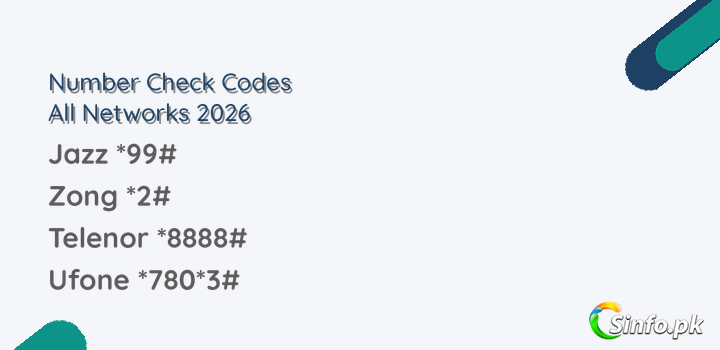
| Network | Code | Backup method |
| Jazz / Warid | *99# | SMS MNP to 667 |
| Zong | *2# | *8# or *5# |
| Telenor | *8888# | Blank SMS to 7421 |
| Ufone | *780*3# | *1# |
How to Check Jazz Number
Dial *99#. Your number appears in a pop-up within seconds. Works on prepaid and postpaid, free of cost, even with no balance. Backup: SMS MNP to 667.
How to Check Zong Number
Dial *2#. If it does not respond, try *8# or *5#. Your Zong number shows on screen, free of charge.
How to Check Telenor Number
Dial *8888#. Backup: send a blank SMS to 7421 and you will get your number by reply (standard SMS charges may apply).
How to Check Ufone Number
Dial *780*3#. If it does not work on your SIM, try the shorter *1#. Both are free.
How to Check Warid Number
Dial *99#. Warid merged into Jazz, so the Jazz code works on Warid numbers.
FAQs
Can I check my number without balance?
Yes. All the USSD codes above are free and work with zero balance.
Why is my code not working?
Weak signal is the most common cause. Move to better coverage and retry. Inactive SIMs cannot use these codes.
Can I find someone else’s number this way?
No. These codes only reveal the number of the SIM in your own phone.
Which number check code should you try first
Start with the main code for your network from the table above: *99# for Jazz and Warid, *2# for Zong, *8888# for Telenor, and *780*3# for Ufone. Give it a few seconds in good signal. Your number should appear on screen as a pop up. If nothing appears, do not keep dialling in a weak signal area. Move closer to a window or step outside and try once more.
If the main code does not respond, use the backup listed for your network in the same table. Zong users can try *8# or *5#, Telenor users can send a blank SMS to 7421, Ufone users can try *1#, and Jazz users can use the SMS MNP to 667 backup. You only need one method to work. Once your number is on screen, save it in your contacts under your own name so you do not have to check again.
If your SIM was ported from another network
A number that was ported keeps its original digits but lives on a new network. That is why the code you need is the code of the network you are on now, not the network the number first came from. For example, a number that started on one network and was later moved will answer to the current network code. If you recently ported and you are not sure which network is active, try the code for the network you ported to first.
Warid numbers are the clearest case of this. Warid merged into Jazz, so a Warid number now uses the Jazz code *99#, even if the SIM packet still says Warid. The same thinking applies to any old SIM: go by the network the SIM registers on today.
If the code is not working
Check the basics first. The SIM needs to be active and registered, it needs signal, and it needs to be in your own phone, because these codes only reveal the number of the SIM making the request. They work without balance, so a zero balance is not the reason for a failure. An expired or long inactive SIM will not respond until it is active again.
Also make sure you are dialling the code exactly as shown, with the star and hash in the right places, and that you are dialling it like a phone number, not sending it as a message. If you have two SIMs in the phone, check that you are calling from the right SIM slot. Most number check confusion comes from checking the wrong slot.
Can I check a number on a SIM that has no balance for months?
Yes, as long as the SIM is still active. These codes are free and they work with zero balance. If the SIM has expired after long inactivity, the code will not work until the number is active again.
Does checking my number charge anything?
The USSD codes in the table are free. The Telenor backup by SMS to 7421 can carry a standard SMS charge, so use the free *8888# code first if you can.
Also check the network code series: which network is 03xx, and how to convert your SIM network.


Add comment